Goal Stories
Traditional goals tend to start strong, and end up collecting dust. Goal Stories change that by keeping your team’s objectives visible, updated, and relevant. Here’s how they work:
- 🎯 Build a structured set of Goal Stories — assigning owners, contributors, and the teams involved for each — to build a canonical source of truth for who’s doing what and why.
- ⏰ Goal owners get reminders to post progress updates on a regular cadence. Updates collect confidence, progress, and a quick written update for instant-read and in-depth progress snapshots.
- 📢 Goal updates are automatically delivered to all of the teams and people involved, via their Daily Digest, team chat, and/or email.
The end result is a live 30,000ft view of plans and progress, and a simple, reliable, noise and meeting-free way for teams to coordinate with each other.
Benefits of Goal Stories
Maintain alignment over the long haul
It’s one thing to plan goals every quarter or year; it’s another to stick with them over weeks and months. Goal Stories keep that alignment alive by putting goals where people already are (your Digest, your check-in) and keeping updates flowing via regular reminders — instead of leaving them buried in a doc or deck nobody revisits.
Eliminate low-value meetings
Status meetings are usually long, usually boring, and a drain on time and money. Goal Stories replace them with a living 30,000-foot view of where every priority stands, giving anyone an instant read on the whole org without a meeting.
Eliminate surprises
Progress alone isn’t a reliable signal for whether a goal is on track, because progress isn’t linear. Goal Stories pair confidence with progress, giving you a clear, predictive signal of where things stand early enough to act on it.
Build trust and autonomy
Autonomy works when everyone has the context to make quality, independent decisions aligned with the company’s needs — and that same shared visibility builds culture. Trust and empathy grow when people share their successes, challenges, and knowledge, and everyone else responds in kind.
Creating Goal Stories
Open the Goal Stories overview by selecting Goals in the sidebar or pressing g from anywhere in Steady. Click “Add goal” to create a new Goal Story. Your title should reflect the outcome you’re after, so you’d call it something like “Ship Dashboard 2.0” rather than “Dashboard work.” Use the description to flesh out details about the goal: what the purpose of the goal is, the business impact, key results, etc. Select “Quick fill” in the description field to start from a built-in or custom Quick Fill template, so every Goal Story in your workspace follows the same structure.
From there, a handful of settings control who’s involved and how the goal behaves over time:
- Owner — the person responsible for the goal. Only the owner gets reminded to post an update; everyone else just receives what gets posted.
- Contributors — people actively working on the goal alongside the owner. They can post updates and edit the goal too, but reminders are the owner’s alone to get. (The same person can’t be both the owner and a contributor on one goal.)
- Teams involved — the teams actively working toward this goal, not just anyone who wants to keep tabs on it. Add a team here and the goal shows up on their Goals page, and everyone on it gets notified — via Daily Digest, chat, and/or email — whenever an update is posted. If someone just wants updates without being on the hook for the goal, have them follow it instead (see “Following Goal Stories” below).
- Start date and end date — the end date is your due date. The start date pulls double duty: it’s also when the reminder schedule kicks off, and it determines which day of the week (for weekly and bi-weekly cadences) or day of the month (for monthly) reminders land on.
- Update cadence — how often the owner is reminded to post an update: weekly, every other week, or monthly. Update reminders stop once a goal reaches its end date.
- Visible to — “Everyone” makes the goal visible workspace-wide; “Involved teams” restricts it to members of the teams you’ve added. If any involved team is itself public, the goal stays visible to everyone no matter what you pick here.
Adding sub-goals
Depending on the scope of the goal, you might want to break things down into sub-goals that squads or individuals can own. You can do that via the “+ sub-goal” button on any Goal page, or via the “Parent goal” field when you’re creating a goal. Goals can be nested up to four levels deep. Just remember; setting goals with your team should be a collaborative process so people feel genuine ownership over their goals.
If you make sub-goals, keep the team and contributors narrow, set their cadence at “weekly”, and set the parent goal cadence to “bi-weekly” or “monthly”. That way, you get a steady drip of updates from your team that you can use to summarize progress at a higher level that’s more suitable for stakeholders.
Completing a goal
To mark a goal as complete, post a goal update and move the progress slider to 100%. Use the summary and body to capture what changed — what shipped, what the outcome was, and any final takeaways worth preserving for the team. That closing update becomes the last entry in the Goal Story, so treat it like a short retrospective: the headline belongs in the summary, the context belongs in the body.
Following Goal Stories
You don’t need to be an owner, contributor, or part of an involved team to stay in the loop on a Goal Story. There are two ways to keep up, depending on how closely you need to track things: follow a goal directly, or use Echoes.
Following a goal
Following gets you the full drip: every update on that goal, delivered the same way involved teams and contributors get it — Daily Digest, chat, and/or email. It’s the right call when there’s one specific goal you care about and want to read every update in full. To follow along, choose “Follow” from the “•••” menu on the goal page. Give people a heads-up in chat or email so they know to look for it.
Using Echoes
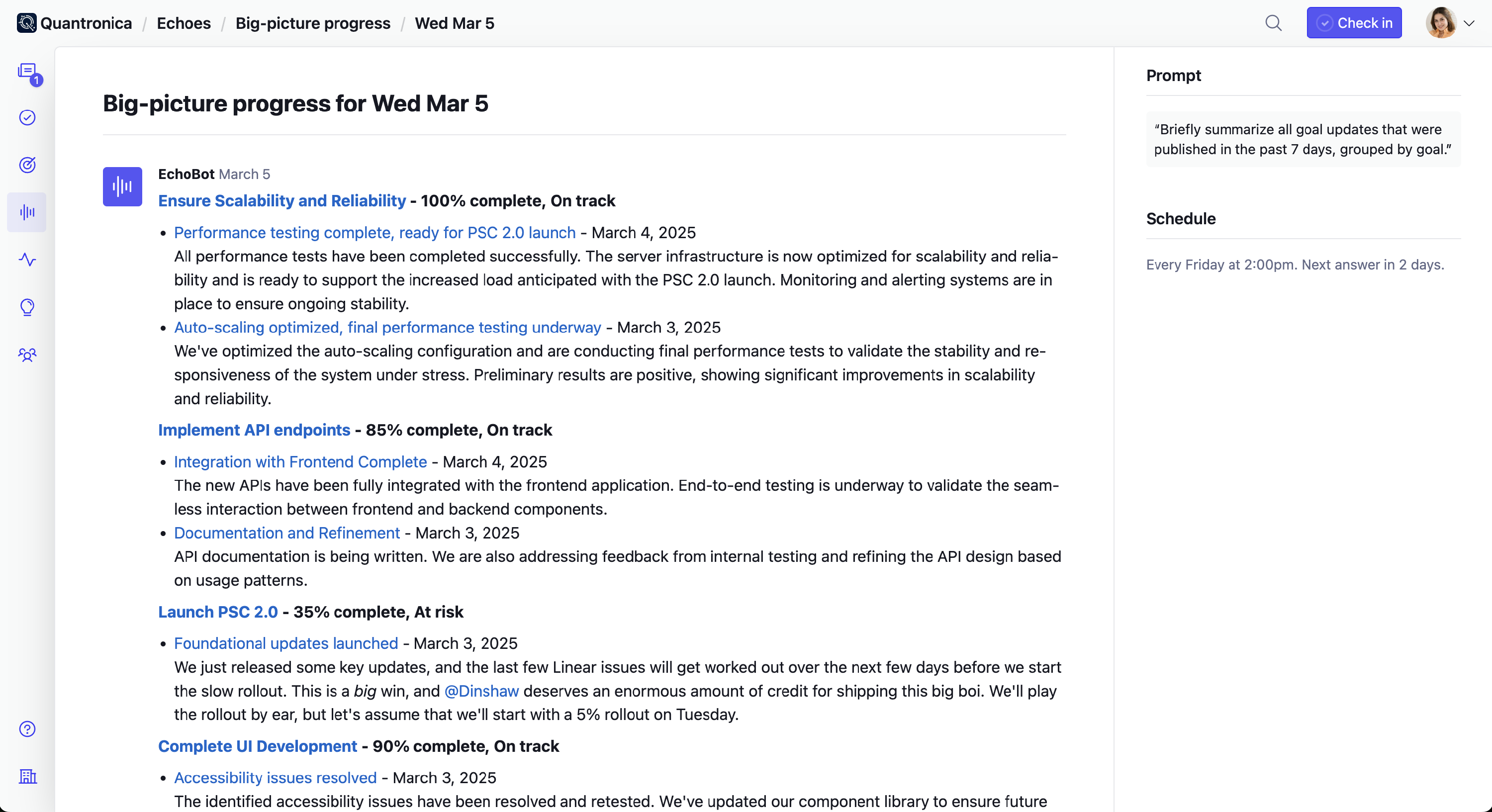
Echoes is the better fit when you’re tracking several goals at once, or you’d rather get the highlights than every individual update. Instead of a fixed drip, Echoes answer a prompt you write on a schedule you control — daily, weekly, biweekly, or monthly — so you can summarize progress across as many goals and teams as you want, at whatever frequency actually suits you.
Use Echoes to:
- Stay informed about key developments across teams without micromanaging.
- Identify potential challenges early and address them proactively.
- Ensure teams remain aligned with the organization’s vision and objectives.
Adding updates
From the goal page, click “Add update” to post a new Goal Story update. Every update has four parts:
- Summary — the headline: your highlight or big takeaway.
- Body — the write-up itself. Select “Quick fill” to start from a built-in or custom Quick Fill template — the built-in “Summarize sub-goals” template pulls in updates from any child goals automatically.
- Confidence — On track, At risk, or Off track: a predictive read on where the goal is headed, independent of raw progress.
- Progress — a 0–100% slider. Move it to 100% to mark the goal complete (see “Completing a goal” above).
Posting an update resolves any pending reminder on that goal and delivers it to everyone involved — the owner, contributors, involved teams, and followers — via Daily Digest, chat, and/or email.
Goal Story Best Practices
The smallest unit of measure should be “project sized”.
Goal Stories are about the big picture over periods of time, not granular tasks. With that in mind, the smallest unit of measure for a goal should be “project-sized”. Keep in mind that every goal assumes that whoever “owns” the goal will provide updates on it. Don’t make a goal for it if you don’t want to report on it! Roll it up with a similar goal into a broader objective instead.
Creating effective Goal Stories
Goals come in infinite flavors, but you should ask yourself two questions before creating a goal in Steady:
- Will this be helpful for me to see every day? Goal Stories in Steady show up on your daily check-in sidebar. Ideally, you want a goal that’ll help you maintain focus on the kind of progress you want to make.
- Do I want to write about this? Remember that Goal Stories in Steady are essentially short-lived blogs about a particular subject. If you don’t want to write about it or don’t think you’d have anything to say, consider a different goal.
Keep it focused
Goal Stories exist to create focus. Creating too many is inherently counterproductive. People should own one to two max. It keeps focus high and “alignment effort” low.
Goal Story owners shouldn’t only be managers
If only a few people own Goal Stories, only a few people get heard. When everyone owns a goal, everyone has a dedicated venue to share their work.
Goal Stories are most effective when they’re not handed down
Alignment requires buy-in, and buy-in happens when everyone has a hand in crafting their Goal Stories. Consider a cascading approach where the manager/leader sets a top-level goal, and folks underneath create their own goals that support it.
Higher level = lower frequency
Consider longer cadences like bi-weekly or monthly for team goals, and weekly cadence for individual goals. That means whenever it’s time to provide a team goal update, you’re guaranteed to have updates from supporting goals on tap.
Writing good updates
When posting an update, enter the highlight or big takeaway as the Summary. Use the body to provide more context. Remember to start with the key points, getting into more detail as you go and following the principles of the inverted pyramid.
Ask yourself, what does my team need to know, and what can’t be seen from available data? You want your updates to get read, so try to make it interesting and keep your audience in mind.